
To Change the Document Type or any Other Field
Editing a Document
-
Highlight the Document
- In the Document List, select the document you want to edit.
-
Open the Fields Tab
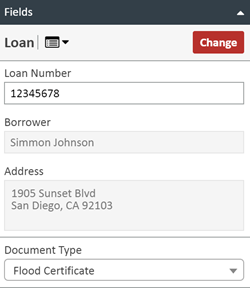
- On the right side of the Document Viewer, click the Fields tab.
-
Change Document Type
- Click the Document Type dropdown box.
- Select the new Document Type.
-
Update Additional Fields
- For example, update the Borrower field or any other relevant fields.
-
Click UPDATE
- Save your changes.
NOTE:
The same process applies to any other document field you need to change.