
System Cleanup
System Cleanup Overview
The Admin Search feature allows administrators to perform or schedule purges to free up server space. It is divided into three main sections:
1. Temp File Purge
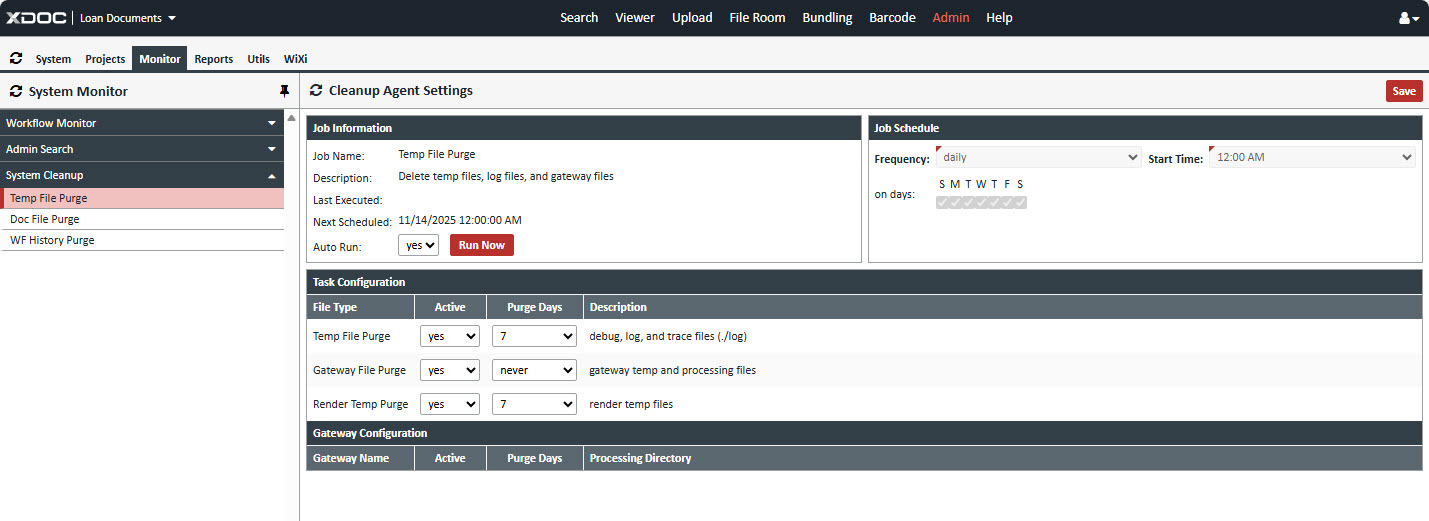
Job Information
Job Name: Temp File Purge
Description: Delete temp files, log files, and gateway files
Last Executed Date:
Next Scheduled Date: The Day and time of the next temp file purge
Auto Run: Yes/no option
Run Now button: to run the temp file purge immediately.
Job Schedule
Frequency: Select Daily, Weekly, Monthly or Yearly
on days: select the day(s) to run
Start Time: Select the time of the day to run the temp file purge
Task Configuration
Temp File Purge
2. Doc File Purge
Delete unreferenced document files
3. WF History Page
Purge Workflow DB activity history and logs