
Settings
This section defines the integration control and security settings for the User Interface Launch Service of the XDOC API to/from AIVA Documents.
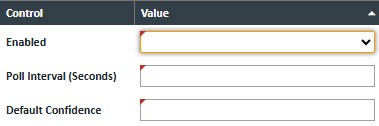
Control - These settings identify the type of security to be used.
| Field | Value |
|---|---|
| Enabled |
Yes/No value – Defines if you are using the AIVA Doc Processing. When this setting is changed this message will appear.
If No, the following are not viewable/configurable
|
| Poll Interval (Seconds) |
Number of seconds to wait between checking for a new completed submission. |
| Default Confidence | Default value for confidence, if not set directly on the AIVA doc mapping. Value must be between 0.00 - 100.00. |

Authorization - These settings are all provided by AIVA and Required.

| Field | Value |
|---|---|
| Url | Authentication url |
| Client Id | Client Id value |
| Secret | Secret value |
| Audience | Audience value |
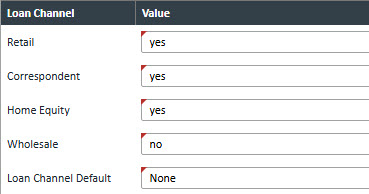
Loan Channel - This allows you to specify whether a particular loan’s documents, based on the selected loan channel, should be processed by AIVA Document Services. Options are "yes" or "no".
The Loan Channel Default setting automatically applies the selected loan channel value to the following location in the user interface:
Upload → Files → Upload → Loan Channel (dropdown)
When a user uploads a document manually, the configured default value will be preselected in the Loan Channel dropdown, reducing the need for manual input and improving efficiency.
Note: If a Loan Channel value is provided through the API Document.DocumentAdd, that value will take precedence. In such cases, the default setting is ignored.
Submission - These settings are provided by AIVA and are used for document submissions.

| Field | Value |
|---|---|
| Url | AIVA supplied Submission url |
| Customer | AIVA supplied Customer value |
| Env | AIVA supplied Env value |
| Channel | AIVA supplied Channel value (not required) |
| Callback Url | XDoc Server Callback url -- /AivaResponse |
| Content Url | XDoc Server Content url -- /AviaDownload |
| Enable Response Logging | Yes/No value – If "Yes", logs will be written to axtsvc_avia_response_log |