
Document Viewer
Document Viewer Configuration – Screen Overview
This screen provides configuration settings that control the behavior, appearance, and functionality of the Document Viewer.
The configuration is organized into three major sections:
1. General
These values define overall, high‑level configuration settings that affect the Document Viewer as a whole.
Examples include: document sorting, grouping, list detail levels, view options, and the new Polling Interval setting.
2. Page Viewer
(These settings describe the behavior of the Page Viewer portion of the Document Viewer.)
This section controls how individual documents/pages are displayed when viewed, including zoom settings, page display mode, filmstrip options, and thumbnail behavior specific to page rendering.
3. Thumbnails
(These values describe the thumbnails in the Thumbnail Viewer, NOT the thumbnails in the Page Viewer described previously.)
This section configures the behavior and display of document thumbnails in the left-hand document list, such as thumbnail size, min/max limits, step changes, page numbering, and note indicators.
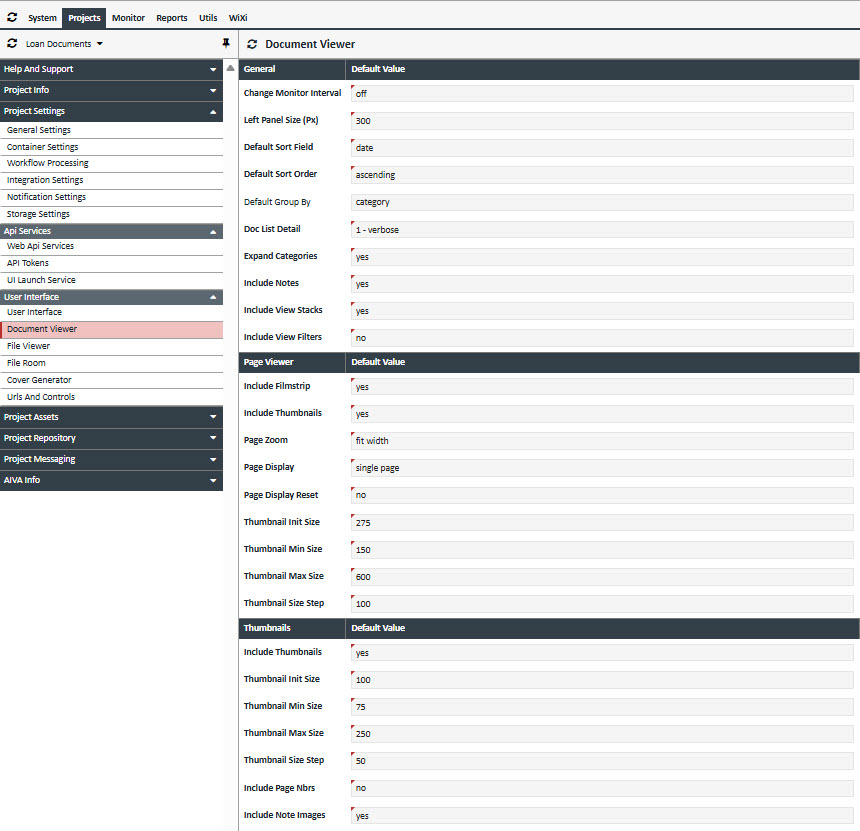
| Section | Field | Type | Options | Description |
| General | Change Monitor Interval |
|
Determines the interval at which the Document Viewer automatically polls/refreshes. "Off" disables polling entirely. | |
| General | Left Panel Size (PX) | Specifies the default width (in pixels) of the Document List panel. | ||
| General | Default Doc Sort Field | Determines the field on which documents are sorted. Sorting occurs within each document category. |
||
| General | Default Doc Sort Order |
|
Defines the default document sort order. | |
| General | Default Group By | Determines the default grouping applied to the documents list. | ||
| General | Doc List Detail |
|
Specifies the detail level shown in the document list. | |
| General | Expand Doc Categories | Yes/No | Controls whether document categories are expanded by default. | |
| General | Include Notes | Yes/No | Determines whether Notes and Page Notes are displayed. | |
| General | Include View Stacks | Yes/No | Controls whether View Stacks are displayed. | |
| General | Include View Filters | Yes/No | Controls whether the Advanced Filters accordion item is shown in the right-hand panel. | |
| Page Viewer | Include Filmstrip | Yes/No |
|
Determines whether Filmstrip Mode is available as a viewing option within the Viewer. |
| Page Viewer | Include Thumbnails | Yes/No |
|
Determines whether Thumbnail Mode is available as a viewing option within the Viewer. |
| Page Viewer | Page Zoom |
|
Sets the default zoom level used when the Viewer first opens. | |
| Page Viewer | Page Display |
|
Defines the default page display mode when opening the Viewer. | |
| Page Viewer | Page Display Reset |
|
If enabled, any custom layout/view settings made by the user in the Viewer are cleared the next time the Viewer opens. | |
| Page Viewer | Thumbnail Init Size |
|
The initial size (in pixels) of thumbnail images when the Viewer loads in Thumbnail Mode. | |
| Page Viewer | Thumbnail Min Size |
|
The minimum allowable size (in pixels) for thumbnails when the user shrinks them in Thumbnail Mode. | |
| Page Viewer | Thumbnail Max Size |
|
The maximum allowable size (in pixels) for thumbnails when the user enlarges them in Thumbnail Mode. | |
| Page Viewer | Thumbnail Size Step |
|
The increment (in pixels) used when the user increases or decreases thumbnail size in Thumbnail Mode. | |
| Thumbnails | Include Thumbnails | Yes/No |
|
Determines whether thumbnail images are shown at all in the Thumbnail Viewer. This value should always be set to “Yes.” |
| Thumbnails | Thumbnail Init Size |
|
The initial thumbnail size (in pixels) when the Thumbnail Viewer loads. | |
| Thumbnails | Thumbnail Min Size |
|
The smallest allowable thumbnail size (in pixels) when the user decreases thumbnail size. | |
| Thumbnails | Thumbnail Max Size |
|
The largest allowable thumbnail size (in pixels) when the user increases thumbnail size. | |
| Thumbnails | Thumbnail Size Step |
|
The increment (in pixels) by which thumbnail size changes whenever the user zooms thumbnails in or out. | |
| Thumbnails | Include Page Numbers | Yes/No |
|
Specifies whether page numbers should be displayed on each thumbnail. |
| Thumbnails | Include Note Images | Yes/No |
|
Determines whether note indicators (note icons or images) are shown on thumbnails for documents in the Document List. |