
Security Profiles
A User Profile is a system-wide access configuration used in conjunction with User Roles. It defines default access settings and plays a key role in system security and integration.
Key Characteristics:
- Each User Profile is typically assigned:
- A Default Role
- A Default Project (commonly the Loan Documents project)
- User Profiles are essential for:
- Document Stack Security
- Active Directory integration
Best Practices:
- If your environment uses only one project, it is recommended to:
- Create one Security Profile per Security Role
- Use matching names for clarity and consistency
- If you are not using:
- Document Stack Security
- Active Directory integration
- Multiple projects
…then Security Roles alone are sufficient, and Security Profiles are not required.
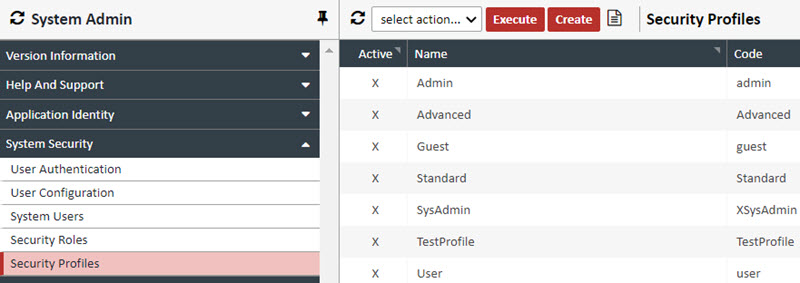
Creating a Profile – To create a Security Profile, follow the procedure below
1. Click CREATE. The Security Profile Editor appears.
2. Complete following Fields: (Required fields are in BOLD)
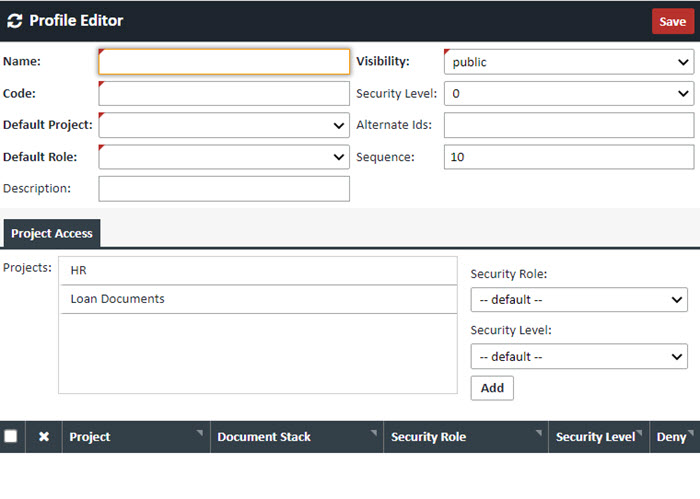
| Field | Value |
|---|---|
| Name | The name of the Profile. |
| Code |
A code that can be a simpler name for the Profile. NOTE: The code is an important field as it is the primary matching field for Active Directory integration, as well as Document Stack Security |
| Default Project | In the mortgage industry, should be set to "Loan Documents" |
| Default Role | Choose the Role assigned to this Profile |
| Description | Any optional description for this Profile |
| Visibility | Should be set to "public" if being actively used |
| Security Level | This field is not currently used |
| Alternate Ids | A mapping field when mapping XDOC permissions to LOS permissions |
| Sequence | This field is not currently used |
3. Optionally in the Project Access Tab, in the Project Security>Project box, either double click the "Loan Documents" project to move it down to the active list of projects for this Profile, or simply highlight it, choose a Security Role from the dropdown and click ADD

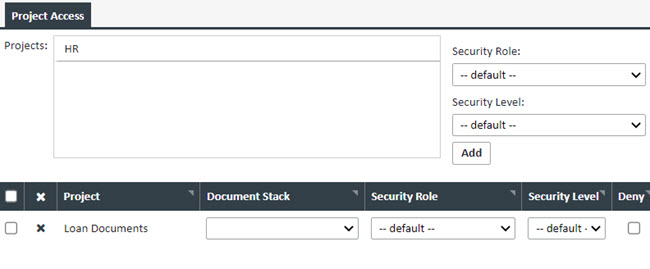
4. Optionally, you can choose a system wide Document Stack Access list from the dropdown, although this is discouraged as the Document Stack Security function is a much more viable solution.
5. When you are done creating your Profile, click SAVE