
Security Roles
A Security Role is a collection of permissions assigned to a user to control access to specific XDOC functions. These roles can be applied to User Profiles to provide centralized and consistent control over XDOC access.
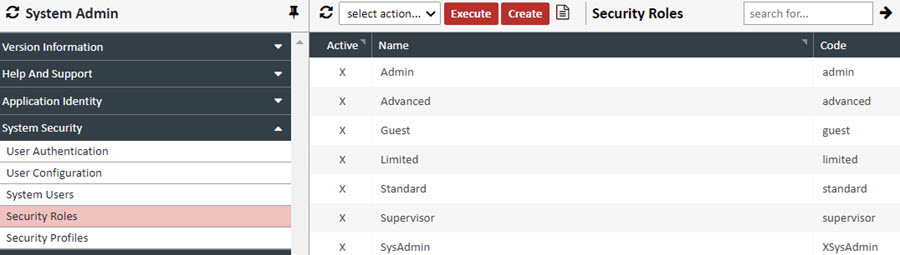
NOTE: On the header of the grid, you can click the report icon  to generate a report of all of the roles in the system.
Creating a Role – To create a Security Role, follow the procedure below:
1. Click CREATE. The Security Role Editor appears
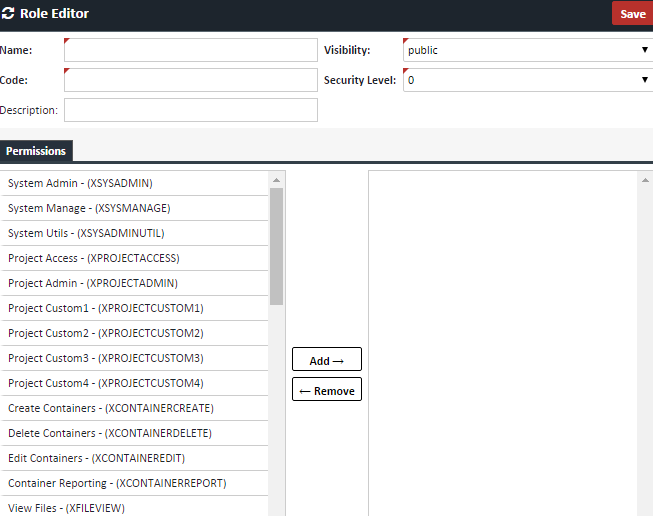
2. Complete the following fields
| Field | Value |
|---|---|
| Name | The name of the Role. |
| Code | A code that can be a simpler name for this Role. |
| Description | Any additional description for this Role. |
| Visibility | Should be set to “public” if being actively used. |
| Security Level | Please leave this alone as it is reserved for future use. |
3. Assign the appropriate permissions to the role by highlighting a permission on the left and clicking the Add button to move it to the right. You can select multiple permissions by with the Ctrl+Click or Shift+Click method. You may also double click any permission to move it to the right.
4. When all permissions have been assigned, click the SAVE button. The new Security role will now show up in the main grid and will be available in creating Security Profiles, to be covered in the next section List of Available Permissions.
Available Permissions
Administrative Permissions
XSYSADMIN
Provides unrestricted access to all XDOC functionality. This permission should be granted only to a limited number of System Administrators, as it provides access to core system settings and configuration folders that control XDOC operations.
XPROJECTADMIN
Provides administrative access within a specific project. Users can manage project-level settings and override system defaults, including:
- Project settings
- Document Types
- Document Categories
- List Definitions
- Field Definitions
- Bundle configurations
XBUNDLEADMIN
Allows users to create and manage Bundle Profiles and Bundle Templates. Also grants access to the Bundling section within Project Administration.
XSYSMANAGE
Provides access to both:
- Admin Utilities (Util) tab
- Workflow Monitor (Monitor) tab
within XDOC Administration.
XSYSADMINUTIL
Provides access only to the Admin Utilities (Util) tab.
XDOCHELPLIBRARY
Provides access to the Wixi administration tab, which contains:
- XDOC Documentation
- API Documentation
- Bundle Token References
- User Guides
- Technical Resources
XPROJECTEREPORT
Provides access to the Reports tab if you don't have the higher permissions to do it.
Project Permissions
XPROJECTACCESS
Provides access to a specific project. All users and administrators working within a project must have this permission.
XCONTAINERCREATE
Allows users to create folders within internal projects.
XCONTAINERDELETE
Allows users to delete folders within internal projects.
XCONTAINEREDIT
Allows users to edit folder properties within internal projects.
Audit Log Permissions
XDOCREPORT
Provides access to document-level information within the Audit Log.
XCONTAINERREPORT
Provides access to loan-level information within the Audit Log.
XDOCTRACE
Provides access to Document Trace information within the Audit Log.
XCONTAINERTRACE
Provides access to Loan Trace information within the Audit Log.
File Room Permissions
Note: Permissions containing DOC apply primarily to the Document Viewer, while permissions containing FILE apply primarily to the File Room.
XFILECREATE
Allows users to upload files without specifying a container or document type.
Note: If this permission is not assigned, Document Type becomes a required field when uploading documents or using the XDOC Print Client.
XFILEDELETE
Allows users to delete files from the File Room.
XFILEASSIGN
Provides access to the File Room.
XFILEDOWNLOAD
Allows users to print and download files from the File Viewer.
XFILEVIEW
Allows users to view individual files in the Workflow Monitor.
Document Viewer Permissions
XDOCVIEW
Provides view-only access to documents within the Document Viewer.
XDOCSEARCH
Allows users to search for loans using the Search screen.
XDOCCREATE
Allows users to create documents by:
- Uploading documents
- Printing to XDOC
- Working within the File Room
XDOCDELETE
Allows users to delete an entire document.
XDOCPAGEDELETE
Allows users to delete individual pages within a document.
Note: Users must also have XDOCDELETE.
XDOCEDIT
Provides general document editing functionality.
Warning: All edit-related permissions require XDOCEDIT. Permissions such as XDOCEDITTYPE, XDOCASSIGN, XDOCMOVE, and XDOCCOPY will not function unless the user also has XDOCEDIT.
XDOCCOPY
Allows users to:
- Copy documents between loans
- Move documents between loans
- Copy document pages
XDOCEDITFIELD
Allows users to edit document field values.
XDOCEDITTYPE
Allows users to change a document's Document Type.
XDOCEDITBUCKET
Allows users to move documents between buckets.
XDOCASSIGN
Allows users to:
- Split documents
- Merge documents
- Copy pages
- Move pages
XDOCMOVE
Allows users to move documents between files.
XDOCNOTATE
Allows users to create and edit their own document and page notes.
XDOCNOTATEALTER
Allows users to edit notes created by any user.
XDOCDOWNLOAD
Allows users to print and download documents.
XDOCEMAIL
Allows users to email documents directly from the Document Viewer.
XDOCBUNDLE
Allows users to bundle documents within the Document Viewer.
XDOCANNOTATE
Allows users to create and manage document annotations.
Note: Available annotation types are configured in:
Project Settings → User Interface → General Settings
XDOCANNOTATEALTER
Allows users to modify permanent annotations created by any user.
Note: Users must also have both XDOCEDIT and XDOCANNOTATE.
XDOCANNOTATEADVANCED
Allows users to print and download documents without permanent annotations.
XDOCVIEWSTACK
Allows users to view available Document Stacks.
XTOOLCOVERSHEET
Allows users to generate and print barcode cover sheets and separator sheets.
XQMSGCREATE
Allows users to create Quick Messages when that feature is enabled.
XQMSGEDIT
Allows users to edit Quick Messages when editing is permitted.
Conditions Permissions
XCONDITIONVIEW
Allows users to view conditions associated with documents.
XCONDITIONASSIGN
Allows users to assign conditions to documents.
XCONDITIONUNASSIGN
Allows users to remove conditions from documents within the Document Viewer.
Note: Users must also have both XCONDITIONVIEW and XCONDITIONASSIGN.
Batch Processing Permissions
XBATCHACCESS
Provides access to batch-processing user interfaces.
XBATCHADMIN
Allows users to create and manage batch definitions and user assignments.
XBATCHCREATE
Allows users to create new batches.
XBATCHPROCESS
Allows users to process batches, including assigning batch documents to loans.
XBATCHDELETE
Allows users to delete batch definitions.
FaxAgent Permissions
XSYSTECH
Reserved for FaxAgent functionality.
XSYSTESTUTIL
Currently supported only by FaxAgent and not used within XDOC.
Other Permissions
XTOOLBARCODEDASHBOARD
Provides access to the Barcode Dashboard link independently of the barcode cover sheet generation functionality controlled by XTOOLCOVERSHEET.
Custom Permissions
XPROJECTCUSTOM1 – XPROJECTCUSTOM4
Generic permissions available for customer-developed extensions and custom web pages.
XTOOLUSERDASHBOARD
Custom permission used by clients who have implemented their own Dashboard interface.
Obsolete Permissions
The following permissions are no longer used in the current version of XDOC:
| Permission | Description |
|---|---|
| XCONTAINEREXPORT | Formerly used by the Document Export Utility. |
| XFILEEMAIL | Emailing from the File Room is no longer supported. |
| XFILEMOVE | No longer used. |
| XFILESEARCH | No longer used. |
| XPROJECTREPORT | No longer used. |
| XSYSREPORT | No longer used. |
This permission model enables organizations to create reusable security roles that simplify user administration while ensuring consistent access control across XDOC.