
User Authentication
XDOC supports both internally and externally created users, which requires flexible configuration options to accommodate the various authentication methods used by different customers.
These settings ensure that user access is managed securely and consistently across all environments.
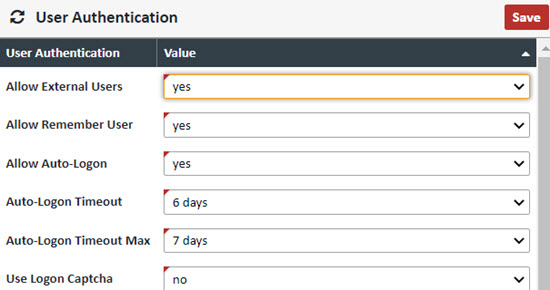
User Authentication – General settings for users and user authentication
| Field | Value |
|---|---|
| Allow External Users | Yes/No to allow for external users. Almost all XDOC integrations will need this set to "yes" |
| Allow Remember User | Yes/No to allow for the application to remember the user name at next logon |
| Allow Auto-Logon | Yes/No to allow for auto-logon so users don't have to log on with a password every time |
| Auto-Logon Timeout | The amount of idle time on a browser session before automatically logging out |
| Auto-Logon Timeout Max | The maximum amount of time allowed for this setting |
| Use Logon Page Captcha | If set to "yes" the system uses a validation security question when logging on to the system for added security |
External User Validation and Lookup
When integrating users from outside the XDOC system, there are two key processes involved:
1. User Lookup
- Purpose: Imports or synchronizes users from an external source into the XDOC system.
- Function: Adds the user to the system without verifying their credentials.
2. User Validation
- Purpose: Authenticates external users to ensure they have valid credentials to access XDOC.
- Function: Confirms that the user is authorized and properly authenticated.
Both processes share the same configuration options, which are defined in the axSystemConfig.xml integration file located on the XDOC server.
⚠️ Important:
These configuration fields are critical to system security and integration.
Do not modify any of these settings without first consulting Axacore Customer Support.
| Field | Value |
|---|---|
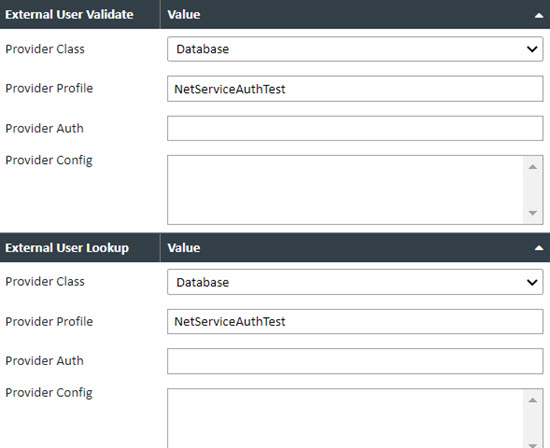
| External User Validate | |
| Provider Class | Field for determining the outside provider. Choices are Active Directory, HTTP Simple Service, Database, and Custom |
| Provider Profile | The connection information in the axSystemConfig.xml file that will connect to this provider |
| Provider Auth | Used for additional configuration auth from the provider. |
| Provider Config | If there is an additional configuration information needed, it goes in this field. |
| Field | Value |
| External User Lookup | |
| Provider Class | Field for determining the outside provider. Choices are Active Directory, HTTP Simple Service, Database, and Custom |
| Provider Profile | The connection information in the axSystemConfig.xml file that will connect to this provider |
| Provider Auth | Used for additional configuration auth from the provider. |
| Provider Config | If there is an additional configuration information needed, it goes in this field. |