Conditions Management Administration
Conditions Management – Admin Functions
This section covers the administrative setup for managing loan conditions in XDOC.
For end-user functionality, please refer to:
End User – Working with Conditions
Integration Overview
XDOC’s conditions management integrates with your Loan Origination System (LOS) using:
-
axSystemConfig.xmlIntegration File- Contains a query that populates the initial list of conditions for a loan into XDOC.
- Each time a user opens the Viewer for a loan, XDOC validates and reconciles the condition list with the LOS to ensure a 1:1 match.
-
XDOC API
- A set of API methods used to manage conditions programmatically.
Key API Methods for Conditions Management
| API Method | Function |
|---|---|
Document.Add |
Adds a document to a loan with a single associated condition. |
Document.AddXml |
Adds a document to a loan with multiple conditions, or multiple documents. |
Condition.Add |
Adds a new condition to a document. |
Condition.Update |
Updates condition properties (e.g., setting a cleared date). |
Condition.Delete |
Removes a condition from a loan. |
📘 Note: For implementation details and sample code, refer to the XDOC API Guide.
This guide provides examples to help tailor the API to your organization’s specific needs.
Conditions Fields Mapping (For LOS/XDOC Integrations)
XDOC allows you to associate one or more LOS condition fields (e.g., condition status, cleared date) with a condition in XDOC through field mapping in the Admin interface.
These mappings are configured in:
Admin > Projects Tab > Project Repository > Container Field Definitions
Important Notes:
- These mappings should be performed by the LOS vendor.
- The fields map directly to the conditions data defined in the
axSystemConfig.xmlintegration file. - Once configured, do not modify these mappings without consulting Axacore Customer Support.
- LOS vendors who wish to automate this mapping process for their clients should contact Customer Support for assistance.
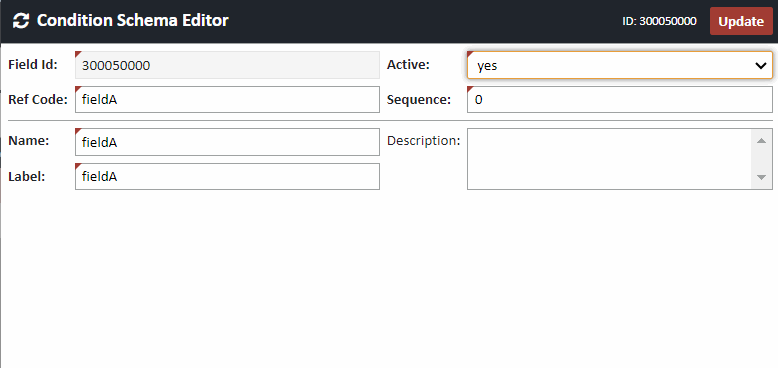
Manual Field Mapping Steps:
-
Navigate to:
Admin > Projects Tab > Project Repository > Container Field Definitions -
Click CREATE.
-
In the Ref Code field, enter the primary key for the condition field.
-
Enter a Name and Label for the field.
These values should be the same for consistency.
-
Click UPDATE.
Repeat this process for each condition field you want to include.