
Bundle Sets
Bundle Sets
Bundle Sets are collections of one or more Bundle Profiles that are delivered together. For example, a loan package may need to be sent simultaneously to both an investor and a servicer. This has become increasingly common in the mortgage industry, where different document packages for the same loan must be delivered to multiple destinations for various business purposes.
Creating a Bundle Set
Bundle Sets are simple to configure and manage in XDOC.
- From the Bundle Sets page, click Create.
- The Bundle Set Editor opens.
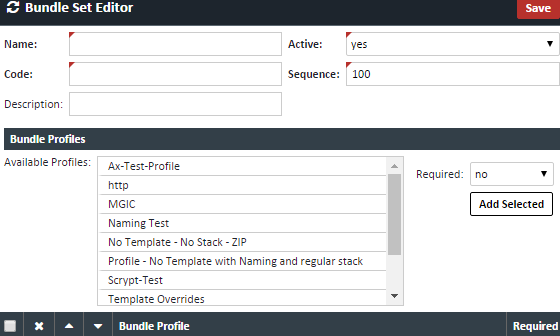
3. Enter the following information
| Field | Description |
|---|---|
| Name | The name of the Bundle Set. |
| Code | An additional code used to identify the Bundle Set. |
| Description | Optional description of the Bundle Set. |
| Active | Select Yes to make the Bundle Set available for use. |
| Sequence | Determines the order in which the Bundle Set appears on the Bundle Sets landing page. |
4. Select the Bundle Profiles to include in the Bundle Set:
-
- Double-click a Bundle Profile, or select it and click the green Add Selected button.
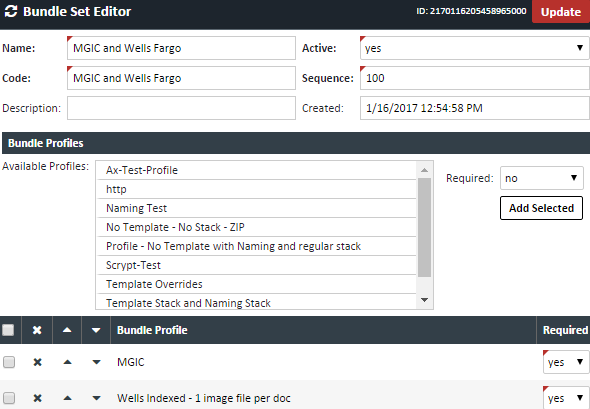
- The order in which Bundle Profiles are added determines the order in which they are sent. You can adjust the sequence before or after adding profiles by selecting a profile and using the Up or Down arrow buttons.
- Set the Required field to Yes for any Bundle Profile that must be sent. This can be configured when the profile is added or updated later from the selected profiles list.
- Click Save when finished.
Sending a Bundle Set
To send a Bundle Set, navigate to the appropriate loan and follow these steps:
- Open the loan in the Document Viewer.
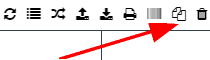
- Click the Bundle icon.
- Select the Set radio button.

- From the Bundle Set drop-down list, select the appropriate Bundle Set.


- Verify all displayed information and complete any additional required fields shown at the bottom of the screen.
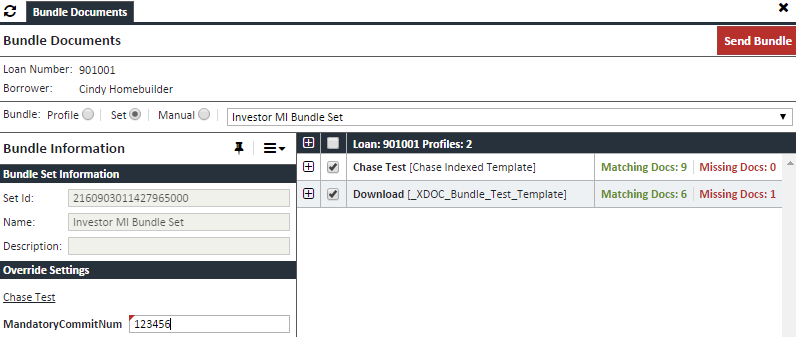
- Click Send Bundle to start the delivery process.
Notes
- Bundle Profiles are sent in the order configured within the Bundle Set.
- Profiles marked as Required must be completed before the Bundle Set can be sent.
- Only Active Bundle Sets are available for selection when sending a bundle.